The 3 ChatGPT Custom Instruction Boxes Explained (and What Wellness Practitioners Should Put in Each)
Jan 23, 2026
Quick Overview:
ChatGPT Custom Instructions help wellness practitioners get more on-brand results by filling out 3 personalization boxes:
- Custom Instructions: how you want ChatGPT to behave and write
- Occupation: your clinical context, audience, and offers
- More About You: your values, tone boundaries, and what you want to avoid
If you’re needing to re-explain yourself every time you open ChatGPT, read this.
If you use ChatGPT regularly, this might feel familiar.
You open a new chat…and you start explaining everything again.
That you’re a functional medicine practitioner.
That you primarily work with women in their 40s.
That the first step in your funnel is a free hormone quiz.
That your clinical lens is shaped by 15 years as an OB/GYN nurse before transitioning into functional medicine.
None of this is new information to you.
But ChatGPT doesn’t know it unless you tell it.
Again.
And again.
And again.
You may have heard that ChatGPT “gets to know you over time,” and in some ways, that’s true.
But if you’re opening fresh chats and still re-introducing your background, your audience, and your preferences ("stop using the em dash!!!") every single time… it starts to feel a lot like explaining the same concept to patients for the hundredth time.
Here’s why that happens:
ChatGPT can’t consistently support you unless it has a foundational understanding of who you are and how you work.
And the very first step to creating that foundation is simple.
It’s your Custom Instructions.
Custom Instructions give ChatGPT a standing reference point for:
- Who you are professionally
- What you’re using ChatGPT for
- Your area of expertise and context
- And how you want it to respond
If you’re tired of repeating yourself and want ChatGPT to actually feel like it understands your work, this blog post is for you.
How Do ChatGPT Custom Instructions Work?
Custom Instructions are a standing set of preferences that ChatGPT uses in your account.
Once they’re set, they apply automatically when you’re working in the default chat window (the one that opens when you log in) and working inside any of your Projects.
In other words, they act as your baseline context. They set a foundational understanding that ChatGPT carries with it as you create content, brainstorm ideas, or refine your messaging.
When Custom Instructions are in place, most practitioners notice:
- Fewer generic or overly broad responses
- Less need to restate their credentials, niche, or clinical lens
- More consistency across posts, emails, blogs, and long-form content
You’re no longer asking ChatGPT to piece together who you are from one conversation to the next. You’re giving it a stable foundation to work from.
Where to Find the 3 Boxes in Your ChatGPT Personalization Settings
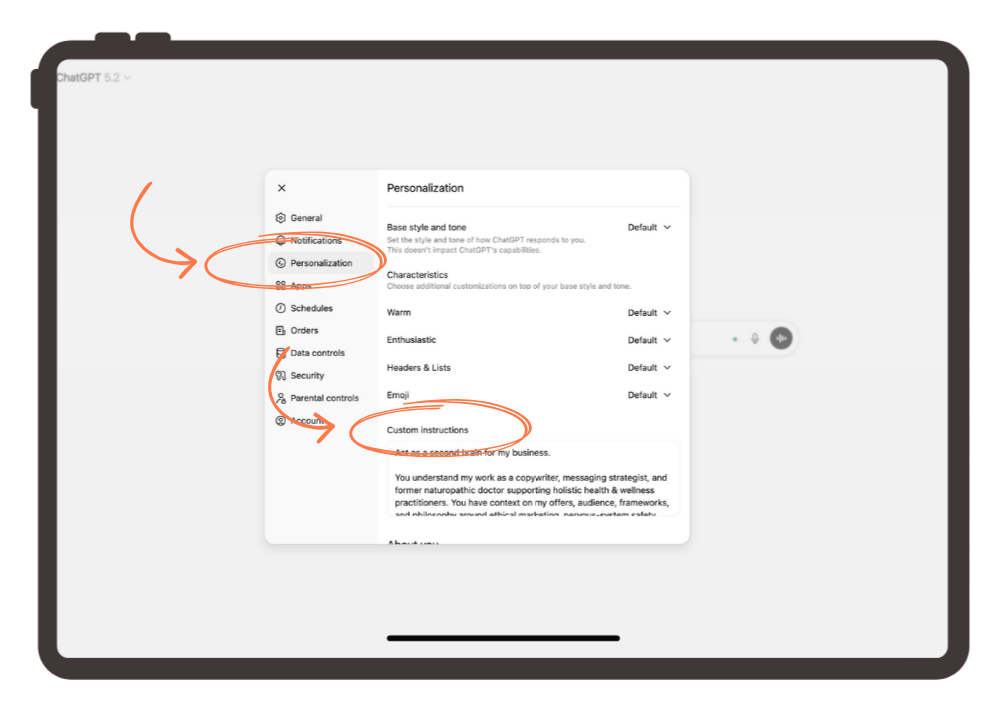
Setting this up is simple and only takes a few minutes. Here’s where to find it:
- Log in to ChatGPT
- Click your profile photo
- Select Personalization
- Scroll until you see the three Custom Instruction fields
You’ll notice there are three distinct boxes.
Each one serves a different purpose.
In this post, I’ll explain what belongs in each box so you understand how the system works.
Box #1: Custom Instructions
Purpose:
This box tells ChatGPT how to show up for you.
It’s where you define the role ChatGPT plays in your work and the standards it should follow every time it responds.
At a conceptual level, this box is about things like:
- The role you want ChatGPT to play
(for example: a supportive writing partner, not a marketer or hype-driven copy machine) - Your tone and style preferences
(short paragraphs, simple language, clean structure, easy to read) - Your ethical boundaries
(no urgency, no fear-based persuasion, no exaggerated claims) - Clear “do this / not that” writing rules
(what’s allowed, what’s off-limits, and what you consistently want reflected)
This is the box that reduces the amount of editing you need to do and creates consistency across your content.
It’s also the box most practitioners either skip or rush through because they’re not sure how to articulate what they want.
Box #2: Occupation
Purpose:
This box gives ChatGPT the professional and clinical context it needs to support you accurately.
It’s where you explain what you do, who you help, and the lens you bring to your work so ChatGPT isn’t filling in gaps with generic assumptions.
At a conceptual level, this box is about things like:
- Your professional role and training
(your credentials, modalities, and scope) - Who you work with
(your ideal clients, population, or primary focus) - The problems you’re known for helping with
(themes, patterns, or outcomes you commonly address) - How your clients typically work with you
(1:1 care, group programs, courses, assessments, etc.) - Where ChatGPT fits into your business
(content creation, education, messaging support, or internal brainstorming)
The easiest mistake to make with this box is staying too vague. It does just say “Occupation,” so you might think you only need to state your title.
But you can include up to 1500 characters, so make the most of it!
When this box is done well, you’ll notice you get fewer clarifying follow-up questions and content that sounds like it was written by someone who understands your work.
Box #3: More About You
Purpose:
This box gives ChatGPT insight into who you are, beyond your credentials and scope.
It’s where you communicate your values, preferences, and non-negotiables so the responses you get actually feel aligned with how you think and how you want to show up.
At a conceptual level, this box is about things like:
- Your values and guiding principles
(what matters most to you in your work and communication) - How you want your marketing and content to feel
(calm, grounded, clear, supportive, confident, etc.) - What you want to avoid
(buzzwords, guru language, fear-based messaging, overpromising) - Your beliefs about ethical marketing and client trust
(education over persuasion, informed consent, long-term relationships) - How you want people to feel after engaging with your content
(more informed, more empowered, less overwhelmed)
This is the box that protects your voice.
It’s what helps ChatGPT understand how to speak on your behalf.
When this box is done thoughtfully, your content feels more human, more consistent, and more like it came from you.
Frequently Asked Questions About ChatGPT Custom Instructions
What are ChatGPT Custom Instructions?
ChatGPT Custom Instructions are settings inside your account that tell ChatGPT who you are, what you do, and how you want it to respond. They act as a foundation that guides every conversation you have, so you don’t have to re-explain your background, audience, or boundaries each time you open a new chat.
This blog post focuses on account-level Custom Instructions, but you can also enter instructions inside Projects and Custom GPTs.
Where do I find ChatGPT Custom Instructions?
You can find them in your account settings. Log in to ChatGPT → click your profile photo → select Personalization → scroll to the Custom Instruction fields. There are three boxes, each with a different purpose.
Is there a word limit for ChatGPT Custom Instructions?
Yes. Well, actually, a character limit. Each Custom Instruction box has a 1,500-character limit.
Do Custom Instructions apply when I use Projects?
Yes. Your account-level Custom Instructions apply inside Projects as well. Although the Instructions inside each Project will take priority, your main Custom Instructions still provide the baseline context.
How often should I update my Custom Instructions?
Anytime your messaging, niche, or offerings shift. It’s also a good idea to revisit them when ChatGPT updates or changes how the Custom Instruction fields work.
If you want content creation to feel easier for your wellness practice, this is the first step
ChatGPT can absolutely support your content creation.
But only with the right setup.
When it’s trained to understand your work, your voice, and your boundaries, it finally starts to feel like a tool you can rely on without wanting to throw the computer across the room every time.
Practitioners inside my programs are using ChatGPT in a way that learns them, grows with them, and evolves alongside their messaging over time.
That doesn’t happen by accident.
It starts with Custom Instructions.
They give ChatGPT a foundational understanding of who you are and how you work so that every conversation builds on the last instead of starting from scratch.